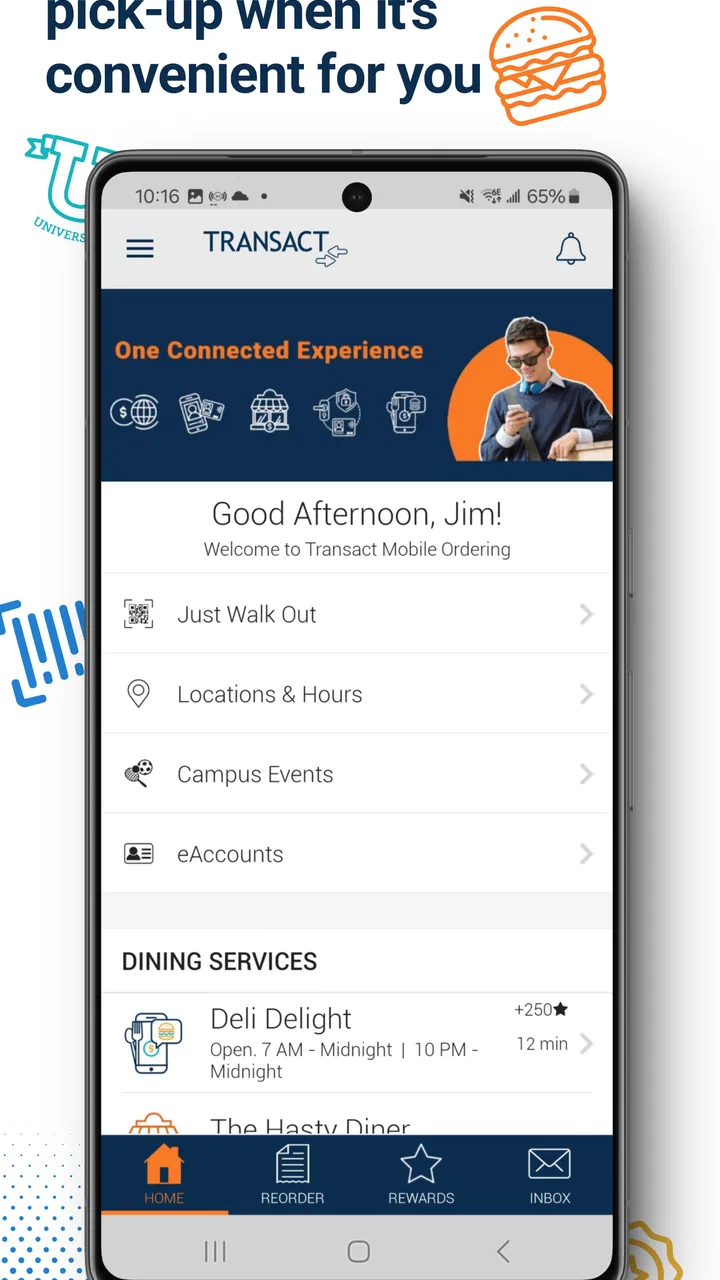
Transact Mobile Ordering
- 4.6
- Rating
- 100.00K
- Installs
- Free
- Price

 Analysis by App-foxy
I found Transact Mobile Ordering most useful in the exact moments when walking to a counter feels like wasted time. It is a free Food & Drink app from Transact Campus Inc. built around a simple routine: choose what you want, pay through the app, and collect the order when it is ready. That sounds modest, but in a busy campus setting, removing even a little uncertainty from lunch can make the whole experience easier.
After using it, my impression is that the app is less about discovering restaurants and more about making an existing campus food routine quicker. It works best when you already know where you want to eat and need a practical way to place the order before arriving. If you expect a broad restaurant marketplace, delivery tracking, or a social food experience, this is probably not the right tool. If your campus or institution supports it, though, the focused approach makes sense.
How Transact Mobile Ordering feels in everyday use
I focus on how Transact Mobile Ordering fits into a familiar campus routine, where its value comes from moving the order ahead of the counter visit. I also look at the practical choices that shape that experience—such as when to order and when a direct conversation is the better option—before turning to the trust questions that matter when payment is involved.
You May Also Like

 AccuWeather: Weather Radar
AccuWeather Review: A Quick, Clear Forecast for Everyday Decisions
For everyday plans, the best forecast is the one you can understand quickly. AccuWeather makes rain timing, radar, and local conditions easy to act on, with a few trade-offs.

 Hill Climb Racing
Why Hill Climb Racing Still Turns Crashes Into One More Run
A tiny car, a bumpy hill and one more upgrade: Hill Climb Racing keeps resurfacing because its simple chaos makes every near-miss feel personal.

 AliExpress - Shopping App
AliExpress Makes Global Shopping Feel Personal, but Shoppers Bear the Risk
AliExpress turns a global marketplace into a pocket-sized discovery engine. Its reach is useful, its shopping loop compelling, and its trade-offs easy to miss.

 Lords Mobile: Kingdom Wars
Lords Mobile Is a Kingdom-Building Routine, Not a Quick Match
A case-by-case verdict on the building, battles, device demands, and social commitments that make Lords Mobile rewarding for some players and exhausting for others.

 PDF Scanner app - TapScanner
TapScanner Makes Paperwork Easier to Capture, Check, and Share
TapScanner makes scanning with a phone feel less like a rescue operation and more like a dependable step in getting work done. Its capture tools are useful, though not flawless.

 Block Blast!
 Shows How Much a Puzzle Game Can Leave Out
A quiet grid game shows why puzzle players increasingly value instant clarity, repeatable skill and low-pressure play—and where the genre still needs to catch up.
More From Our News Desk
View All News


Speed starts with the ordering situation, not just the app
The main speed advantage is the reduction in counter time. I can make the order while walking across campus, between classes, or before leaving a meeting, rather than waiting until I reach the food outlet. That makes the app feel fast in a practical sense, even though the final pickup still depends on the kitchen and the current rush.
That distinction matters. Mobile ordering cannot make a crowded dining location prepare food instantly. What it can do is move the selection and payment steps earlier. In a quiet period, that may make the whole process feel nearly effortless. During a lunch rush, the benefit is more about avoiding the ordering queue than receiving an immediate meal.
I would not treat the app’s interface as a promise of a precise pickup time. The useful habit is to place an order with enough breathing room, especially when the meal matters for a tight schedule. The app can streamline the front end, but it does not remove real-world delays such as a busy kitchen, a popular menu item, or a crowded pickup area.
For a familiar order, the workflow is especially convenient. Once I know what I want, I can focus on selecting the location and completing the purchase instead of standing in line while deciding. That makes it a good fit for repeat lunches, coffee stops, and quick meals where speed matters more than browsing.
What happens during heavy-use moments
The most revealing test for this kind of app is not a quiet afternoon. It is the period when many people are trying to eat at once. In those moments, the value of ordering ahead becomes clearer, but expectations need to stay realistic. A digital queue may be easier to manage than a physical one, yet the food outlet still has to handle every order.
I see three useful ways to approach a busy period. First, order before reaching the busiest part of the rush. Second, choose a pickup point that is genuinely on your route rather than one that looks convenient on a map. Third, leave time to find the collection area and check the order before rushing away. That last step is easy to overlook when the app has made the ordering part feel so quick.
There is also a trade-off in ordering early. If plans change, a mobile order may become inconvenient because the food is tied to a particular pickup routine. I would use it when I am reasonably sure I will be near the selected location, not as a casual way to reserve food hours in advance without thinking about the timing.
For group situations, the app can simplify individual payment because each person can handle their own order. However, it may be less suitable if everyone wants to coordinate one shared meal, split items, or keep changing choices at the last second. In that case, ordering together at the counter may be clearer, even if it takes longer.
Reliability is about the complete handoff
I judge a mobile-ordering app by more than whether the checkout screen opens. The important chain is selecting the correct place, choosing the right items, completing payment, knowing where to collect the food, and matching the final order to what was requested. Transact Mobile Ordering is most useful when that whole chain is predictable.
The app’s focused purpose helps with that. It is not trying to be a general-purpose food platform filled with unrelated restaurants and delivery options. That narrower role can make the decision process less distracting. I can use it as an extension of a campus dining routine rather than learning a large marketplace every time I want lunch.
Still, reliability depends on the local ordering setup as much as on the application itself. A good experience requires the participating food location to keep its menu and pickup process understandable. If an outlet is busy, changes availability, or has a confusing collection point, the app cannot completely compensate. My advice is to pay attention to the pickup instructions and not assume that every location handles orders in exactly the same way.
Recovery is another practical concern. If something goes wrong, the first step should be to check the order details and payment confirmation before placing a second order. Duplicate orders are an easy mistake when a screen seems slow or a user is unsure whether the first attempt succeeded. I would also keep the app open long enough to confirm the transaction rather than immediately closing it after tapping the payment button.
When collecting food, checking the contents before leaving is sensible, particularly for customized meals or orders with several items. This is not a criticism unique to Transact Mobile Ordering; it is simply where digital convenience meets a physical handoff. The app can record what was requested, but the final check still happens at the pickup point.
Device limits and the right expectations
The application requires a device running at least iOS or Android version 10, so it is aimed at relatively modern phones rather than very old hardware. That requirement is worth considering if you keep an older handset for campus use or share a device with someone else. A phone that cannot meet the minimum operating-system requirement will be a barrier before the ordering experience even begins.
On a supported phone, I would expect the basic tasks to be manageable: opening the app, selecting food, paying, and checking the order. Those actions are less demanding than video editing, gaming, or constant background synchronization. In normal use, the app’s focused purpose suggests a lighter workload than a large entertainment app, although the exact feel will still vary with the phone, connection, and local setup.
Resource use is most relevant when the phone is already under pressure. If storage is nearly full, the operating system is outdated, or the device is struggling with many open apps, a checkout workflow can feel less dependable regardless of the ordering app. Before relying on it for a time-sensitive meal, I would update the phone when practical, close unusually demanding apps, and avoid placing an order in a location with an unreliable connection.
I would also avoid treating a weak signal as a harmless inconvenience. Browsing a menu and submitting payment are not the same thing. If the connection drops at the wrong moment, uncertainty about whether the order went through can create more trouble than simply waiting a few minutes. A stable connection is part of the experience, even though it is not a feature inside the app itself.
Battery demand is unlikely to be the main reason to reject this app, because the intended session is short rather than continuous. The more realistic concern is arriving with a nearly empty phone and needing the device for payment confirmation, directions, or communication afterward. For a long day on campus, I would consider the phone’s overall battery condition rather than blaming a brief ordering session for every power problem.
Who will get the most from it
This app makes the most sense for students, staff, and visitors who regularly use a participating campus food service. It is particularly helpful for people with short breaks, anyone who dislikes waiting in crowded lines, and users who already know their preferred meal. The free price also removes the usual hesitation about trying a basic ordering tool.
A realistic example would be a student finishing a class with only enough time to eat before the next one. Instead of joining a line and hoping the meal is ready quickly, the student can place the order while leaving class, walk to the selected location, and use the saved time to get through pickup. If the outlet is busy, the advantage may be avoiding the ordering queue rather than skipping all waiting, but that can still make the break less stressful.
It can also suit someone who finds spoken counter orders awkward or who prefers to review the meal choice before paying. Entering the order on a screen gives more control over the selection process. At the same time, users who need detailed personal assistance, have complicated dietary questions, or want to negotiate substitutions may be better served by speaking directly with staff.
I would be more cautious about recommending it to occasional visitors who do not know the campus layout. The app can help place an order, but a newcomer may still need to identify the correct building, counter, or pickup area. In that situation, ordering in person can provide immediate guidance and reduce the risk of choosing a location that is inconvenient to reach.
Where it differs from ordinary alternatives
The obvious alternative is walking up to the counter. That method remains better when you need to ask questions, change the order repeatedly, inspect options in person, or resolve an unusual request immediately. It also avoids the need to learn a separate ordering process. The cost is time spent waiting and making decisions in a public queue.
Another alternative is a broad delivery or restaurant marketplace. Those services are usually more useful when you want food from many independent places or need delivery away from campus. Transact Mobile Ordering has a narrower purpose: it is for ordering and collecting through the supported campus environment. That focus can feel cleaner, but it also means the app is not a replacement for a delivery platform.
Calling ahead can work for a familiar outlet, yet it is less convenient when you need to see the available choices or pay as part of the same workflow. A campus dining website may offer similar information on some devices, but a dedicated mobile experience is easier to reach when you are moving between locations. I would choose the app for repeat, time-sensitive purchases and use the counter for questions or exceptions.
The biggest trade-off is control versus flexibility. Digital ordering gives me more control over timing and payment before arrival. In-person ordering gives me more flexibility to react to what is available right now. Neither approach wins every situation, and the best choice depends on whether my priority is avoiding a line or having a conversation with staff.
Useful habits that make the experience smoother
My first tip is to learn the pickup geography before relying on the app during a short break. A few minutes saved at the counter can disappear if the selected outlet is in a different building or the collection point is separate from the main entrance. The app is most effective when the physical route is already familiar.
Second, use it for predictable orders before experimenting with complicated ones. A familiar meal makes it easier to notice whether the app’s workflow suits you. Once that feels comfortable, you can decide whether customization is worth handling digitally or whether a direct conversation is safer.
Third, do not immediately submit another order when the payment step seems slow. Check whether the order appears in the app or whether a confirmation is visible first. This simple pause can prevent accidental duplicates and is especially important when the network is inconsistent.
Fourth, treat the pickup moment as part of the ordering process. Keep the relevant confirmation available, go to the correct location, and check the bag before leaving. The app reduces friction, but it does not eliminate the need for attention at the final handoff.
Finally, keep the app for the situations where it saves time. If I am already standing at an empty counter, opening the app may add steps instead of removing them. Convenience comes from matching the tool to the moment, not from using mobile ordering automatically every time.
What the current app profile suggests
The application has been available since September 25, 2018, and its current version is 2026.3. That long presence gives it the feel of an established campus utility rather than a brand-new experiment. It has a 4.6 average from around 6.7 thousand ratings, with over 100 thousand installs, which indicates that many people have found a reason to keep using it.
Those figures do not guarantee that every local dining location will feel equally smooth, but they do make the app easier to take seriously than an untested ordering tool. I would still base the decision on whether the campus food outlets I actually use are supported and whether their pickup routines fit my schedule.
It is rated for Everyone, which is appropriate for a basic food-ordering service. The free download also makes trying it low-risk. The more important question is not age suitability or price; it is whether the app connects to the places where I regularly eat.
My performance verdict
Transact Mobile Ordering feels strongest when the goal is to move ordering and payment away from a busy counter. Its perceived speed comes from preparation and queue avoidance, not from promising that kitchens can work beyond their capacity. For a routine campus lunch, that is a meaningful improvement.
In terms of stability, I would describe it as a practical tool that rewards a supported device, a decent connection, and a little attention during confirmation and pickup. It is not the right choice for every food situation, particularly when I need detailed assistance or want delivery from a wide selection of restaurants.
My recommendation is simple: use it when you already know the campus location, have a reasonably modern phone, and want a cleaner way to order before arriving. Skip it when the order is complicated, the pickup route is unfamiliar, or speaking with staff would prevent uncertainty. For the right routine, the app does exactly what I want from it: it makes a campus meal feel more organized without pretending to be a full restaurant marketplace.
FAQs for Transact Mobile Ordering
01What is Transact Mobile Ordering, and what can I use it for?
Transact Mobile Ordering is a campus-focused mobile ordering service that lets students, staff, and visitors browse participating dining locations, view available menus, customize items, and submit orders from a phone. Depending on the institution, it may support pickup at cafés, food courts, convenience stores, or other campus venues, helping users avoid queues and check order details before visiting.
02How do I place an order with Transact Mobile Ordering?
After signing in or selecting your participating campus, choose a dining location and browse its currently available menu. Add items to your cart, review modifiers such as sizes or ingredients, select a pickup location and time if offered, then confirm payment and submit the order. Availability, ordering windows, pickup instructions, and customization options can vary between campuses and individual venues.
03Does Transact Mobile Ordering require a campus account or student identification?
In many implementations, Transact Mobile Ordering is connected to a university or institutional account, so you may need campus login credentials or an account created through the institution’s Transact system. Some locations may allow guest access, while others require an eligible student, employee, or visitor profile. Check your school’s instructions because login and eligibility requirements are not identical everywhere.
04What payment methods are supported, and can I use a campus meal plan?
Payment options depend on how the app has been configured by your school or organization. Supported methods may include campus meal plans, dining dollars, stored-value accounts, credit or debit cards, and other approved payment options. Before submitting an order, review the payment source and total carefully. Refunds, declined payments, taxes, fees, and balance adjustments are generally handled according to the institution’s dining policies.
05What should I do if my order is late, incorrect, or unavailable?
First, review the order status and pickup instructions shown in the app, since preparation times can change during busy periods. If an item is missing, incorrect, or the venue cannot fulfill the order, contact the dining location or campus support team as soon as possible and keep your receipt or order number available. The app may provide support details, but resolution and refund policies are determined by the participating institution.
Pros
- Order ahead and reduce time spent waiting in line.
- Conveniently browse menus and customize items before checkout.
- Digital receipts make it easier to track past purchases.
- Useful for busy users who prefer contactless ordering.
- Clear order status updates can simplify pickup coordination.
Cons
- Availability and features may vary between participating businesses.
- Some locations may have limited menu items available in the app.
- Pickup delays can still occur during busy periods.
- Account or payment setup may be required before ordering.
- App usefulness is limited if nearby venues do not support it.

Transact Mobile Ordering
Gallery